> For the complete documentation index, see [llms.txt](https://kb.logicerp.com/llms.txt). Markdown versions of documentation pages are available by appending `.md` to page URLs; this page is available as [Markdown](https://kb.logicerp.com/logic-erp-learning-hub-tutorials-and-best-practices/setups/configurations/sale-voucher-configuration/other-settings-1/other-settings/defaults-2/customer-point-config.md).
# Customer Point Config
**YouTube:** [How to Set Default Customer Point Configuration in Sale Bill?](https://www.youtube.com/watch?v=zA4Z4dd59-Y)
## How to Set Default Customer Point Configuration in Sale Bill?
This tutorial explains how to configure a **default point system** in Logic ERP so that customer points are automatically calculated and applied during billing.
***
### **Access Sales Voucher Configuration**
* Open the **Sales Voucher Configuration** window.
* Select the **relevant billing series**.
* Under **"Other Settings - 1"**, click on **"Other Settings"**.
* Then navigate to **"Defaults - 2"**.
* Locate the option labeled as:
> **"Customer Point Config"**
* This section displays all existing **point configurations** available in the system.
***
### **Create a New Point Configuration (if needed)**
* Go to **Set Customer Points Configuration** from the module dropdown.
* A list of existing point configurations will be displayed.
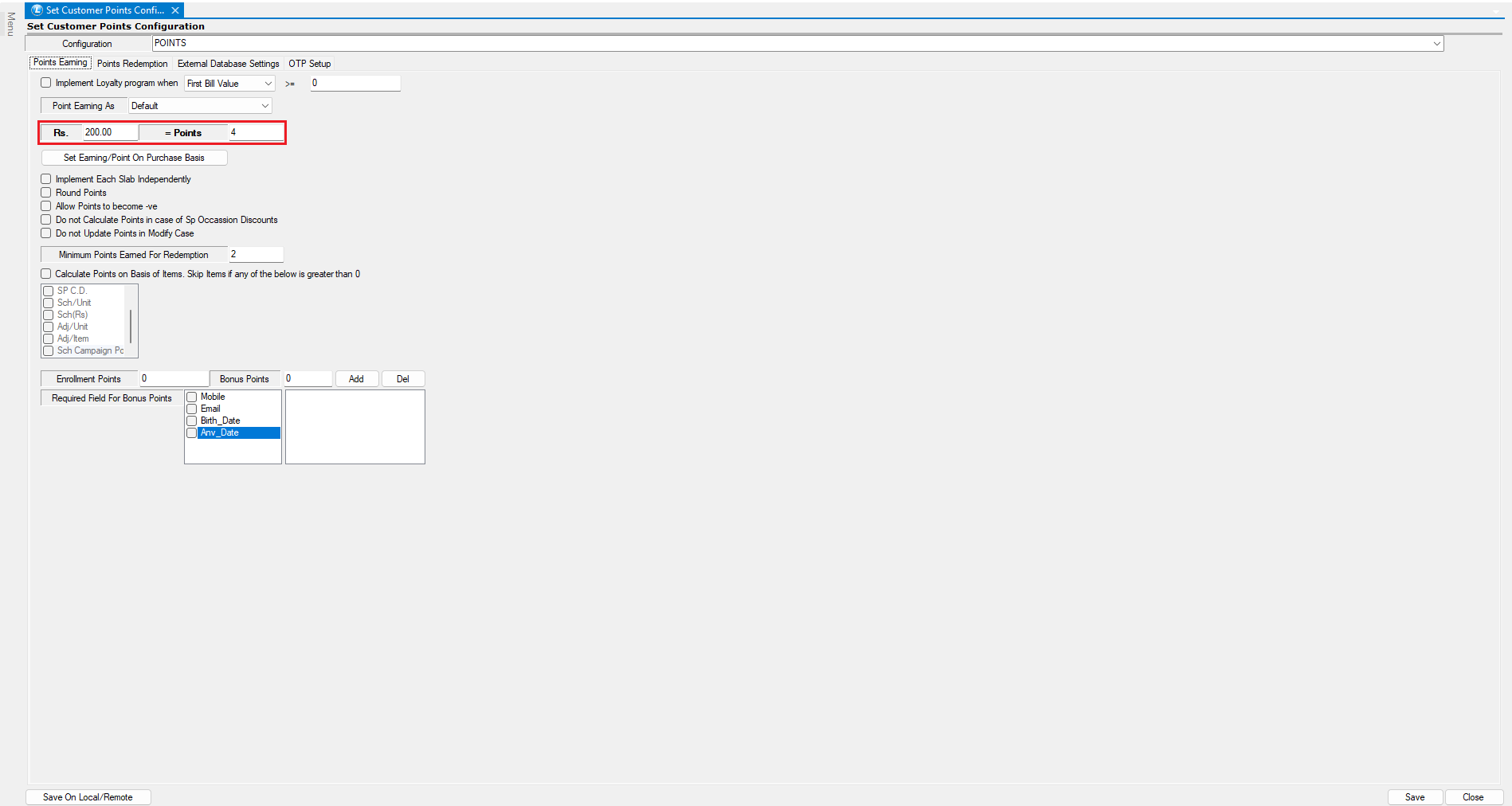
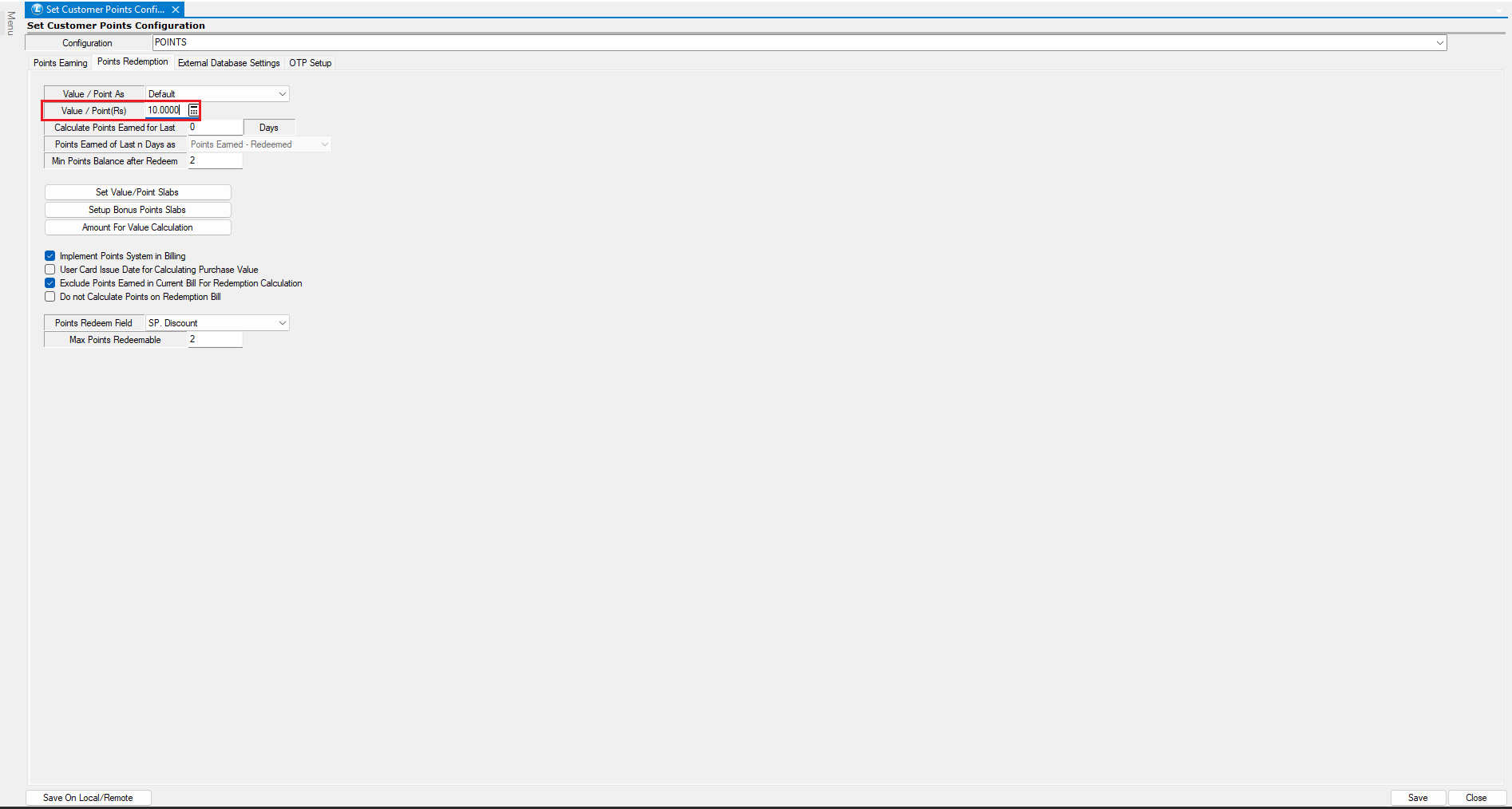
* Click **Create New** and define the configuration parameters:
* Example:
* ₹200 = **4 points**
* **1 point = ₹10 value**
* Save the configuration once completed.
***
### **Assign the Default Point Configuration**
* Return to the **Sale Voucher Configuration**.
* From the **Customer Point Config** dropdown, select the newly created configuration.
* Save the settings.
***
### Implement **the Default Point Application in Billing**
* Open the **Sale Voucher** window and start a new transaction.
* Add items to create a bill worth ₹2,500.
* Based on the configured rule (₹200 = 4 points), the system automatically:
* Calculates **50 points earned** for the current bill.
* If the customer had **2 points previously**, the **total available becomes 52**.
* This value is displayed on-screen during billing.
***
### **Redeem Points**
* Enter the number of points the customer wishes to **redeem** (e.g., 20 points).
* The system will calculate the **discount value** (e.g., 20 × ₹10 = ₹200).
* Save the voucher to complete the transaction.
***
### **View Customer Point Ledger Report**
* Navigate to the **Customer Points Ledger Report**.
* This report provides a complete history of:
* Points **Earned**
* Points **Redeemed**
* **Current Balance**
* Helps in tracking and managing **loyalty engagement** effectively.
***
### C**onclusion**
Setting a **default point configuration** ensures:
* **Automatic point calculation** during billing.
* **Efficient loyalty management**.
* A seamless experience for both customers and cashiers.
---
# Agent Instructions
This documentation is published with GitBook. GitBook is the documentation platform designed so that both humans and AI agents can read, navigate, and reason over technical content effectively. Learn more at gitbook.com.
## Querying This Documentation
If you need additional information that is not directly available in this page, you can query the documentation dynamically by asking a question.
Perform an HTTP GET request on the current page URL with the `ask` query parameter, and the optional `goal` query parameter:
```
GET https://kb.logicerp.com/logic-erp-learning-hub-tutorials-and-best-practices/setups/configurations/sale-voucher-configuration/other-settings-1/other-settings/defaults-2/customer-point-config.md?ask=&goal=
```
`ask` is the immediate question: it should be specific, self-contained, and written in natural language.
`goal` is optional and describes the broader end goal you are ultimately trying to accomplish on behalf of the user. GitBook uses it to tailor the answer towards what is most useful for that goal.
The response will contain a direct answer to the question and relevant excerpts and sources from the documentation.
Use this mechanism when the answer is not explicitly present in the current page, you need clarification or additional context, or you want to retrieve related documentation sections.