> For the complete documentation index, see [llms.txt](https://kb.logicerp.com/llms.txt). Markdown versions of documentation pages are available by appending `.md` to page URLs; this page is available as [Markdown](https://kb.logicerp.com/logic-erp-learning-hub-tutorials-and-best-practices/setups/setup-items/setup-company.md).
# Setup Company
**YouTube:** [How to Create or Edit a Brand or Company?](https://www.youtube.com/watch?v=iCt-NyM9wfo)
## How to Create or Edit a Brand or Company?
In this tutorial, we will learn how to **set up a new brand or company in Logic ERP**. Brand setup helps in organizing items, simplifying sales and purchase entry, and generating brand-wise analytical reports.
***
### **Access to Company (Brand) Setup**
* Navigate to the **Main Menu**
* Open the **Setup Module**
* Click on **Setup Items**
* Select **Setup Company**
This window is used to **define and manage brands** in Logic ERP.
***
### **Create a New Brand**
* All existing brands are displayed in the grid
* To create a new brand:
* Enter the **Brand Name**
* Enter the **Brand Short Name**
* Click **Save**
The new brand is now successfully created.
***
### **Hide or Control Brand Visibility (Optional)**
* If you want to hide a brand:
* Go to the **Hide** column
* Press the **Space Bar** to mark it as **True**
* Hidden brands will not appear in selection lists during transactions
***
### **Set Brand Display Order**
* Click on the **Set Order** option
* You can:
* Arrange brands **alphabetically**, or
* Manually reorder them using the **arrow keys**
* Save the changes
The same brand order will be reflected **uniformly across the entire system**.
***
### **Assign Brand While Creating Items**
* Open **Setup Item – Multiple Pack Size** from the menu bar
* While creating or editing an item:
* Select the appropriate **(Company) Brand** from the dropdown list
* Save the item
This links the item permanently with the selected brand.
***
### **Use Brand During Purchase and Sales Entry**
#### **Purchase Voucher**
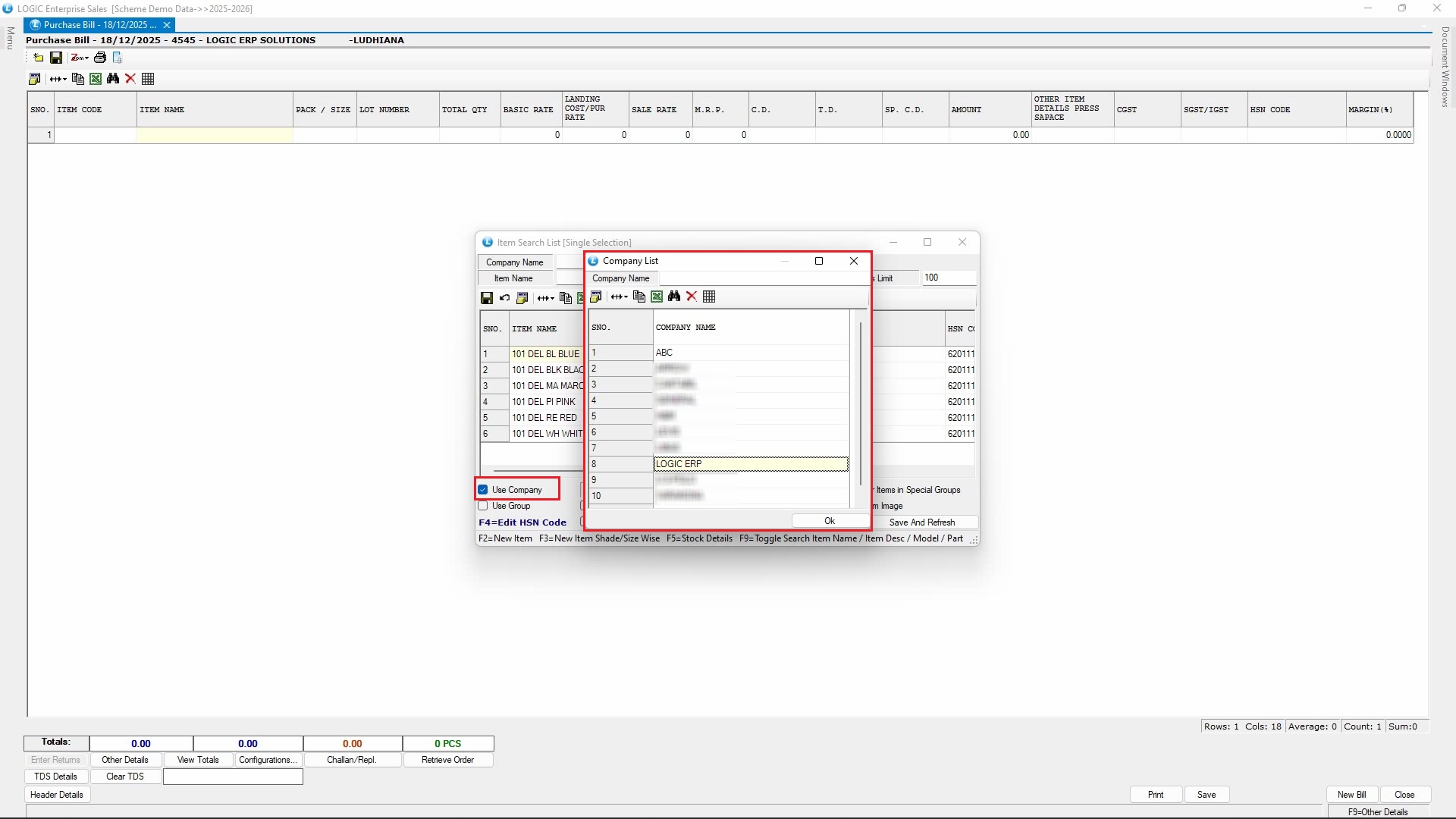
* Open the **Purchase Voucher** window
* Start a new transaction
* While searching for items, enable the **Use Company** option
This helps filter items **brand-wise**, making item selection faster and more accurate.
#### **Sales Voucher**
* The same brand filtering option is also available during **Sales Entry**
***
### **Brand-Based Filtering in Voucher Search**
* Open the **Voucher Search** window while modifying a sale or purchase bill
* Click **Item Search Filters**
* Select the **(Company)** **Brand.**
* The system will:
* Display only those vouchers where items from the selected brand were used
This feature is extremely helpful for **brand-specific tracking, review, and analysis**.
***
### **View Brand-Wise Reports**
Logic ERP allows easy **brand-wise reporting**.
#### **Example: Month-Wise Consolidated Sales Report**
* Open **Month-Wise Consolidated Sales Report**
* Select appropriate report and click to **Create**
* The report displays:
* Monthly sales value for each brand
* Clearly organized brand-wise sales data
This makes it easy to **compare brand performance across different months** and analyze trends effectively.
***
### **Conclusion**
Setting up brands or companies in Logic ERP helps you:
* Organize items efficiently
* Speed up sales and purchase entry
* Enable accurate brand-wise tracking and reporting
* Analyze brand performance with ease
This structured approach ensures better control and visibility across your business operations.
---
# Agent Instructions
This documentation is published with GitBook. GitBook is the documentation platform designed so that both humans and AI agents can read, navigate, and reason over technical content effectively. Learn more at gitbook.com.
## Querying This Documentation
If you need additional information that is not directly available in this page, you can query the documentation dynamically by asking a question.
Perform an HTTP GET request on the current page URL with the `ask` query parameter, and the optional `goal` query parameter:
```
GET https://kb.logicerp.com/logic-erp-learning-hub-tutorials-and-best-practices/setups/setup-items/setup-company.md?ask=&goal=
```
`ask` is the immediate question: it should be specific, self-contained, and written in natural language.
`goal` is optional and describes the broader end goal you are ultimately trying to accomplish on behalf of the user. GitBook uses it to tailor the answer towards what is most useful for that goal.
The response will contain a direct answer to the question and relevant excerpts and sources from the documentation.
Use this mechanism when the answer is not explicitly present in the current page, you need clarification or additional context, or you want to retrieve related documentation sections.