> For the complete documentation index, see [llms.txt](https://kb.logicerp.com/llms.txt). Markdown versions of documentation pages are available by appending `.md` to page URLs; this page is available as [Markdown](https://kb.logicerp.com/logic-erp-installation-configuration-and-troubleshooting-solutions/faqs/reports/generate-report-for-expired-stock.md).
# Generate Report for Expired Stock
**YouTube:** [How to Generate Report for Expired Stock?](https://youtu.be/tiNbrGNgIe0)
## How to Generate Report for Expired Stock?
In this tutorial, we’ll learn how to configure the **Expiry Stock Report**, which helps in monitoring, tracking, and clearing expired stock items efficiently.
***
### **Open and Create a New Configuration**
* Navigate to the **Reports & Queries** section.
* Under **Stock Reports**.
* Open the **Stock Query Report**.
* Click on **Configuration** to create a new report setup.
* Assign a **suitable configuration name** for easy identification.
***
### **Select and Customize Report Columns**
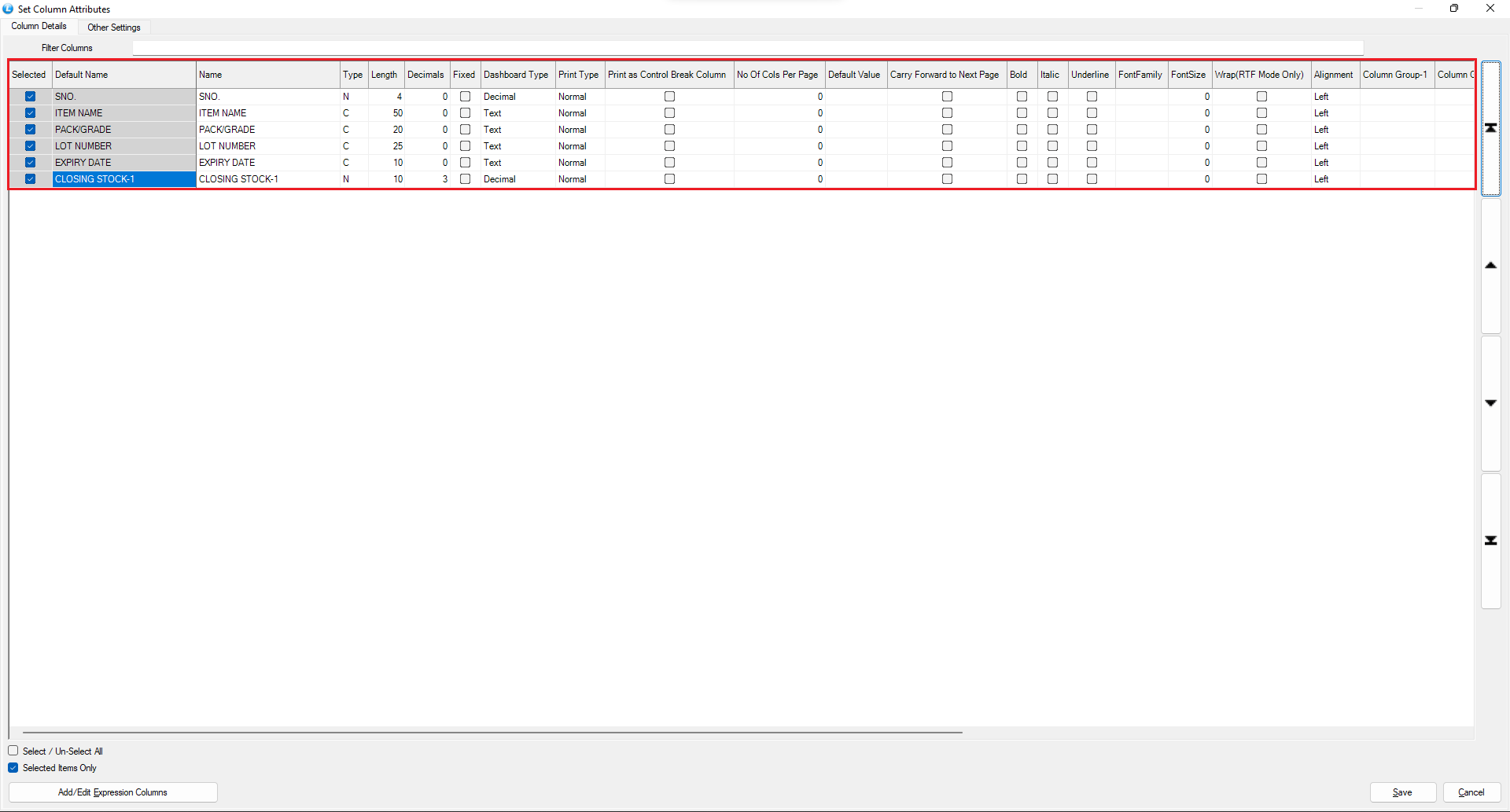
* Under **Print Options**, click **Print Columns** to view the list of available columns.
* Select the following key columns:
* **Item Name**
* **Pack Name**
* **Lot Number**
* **Expiry Date**
* **Closing Stock**
* Press the **Space Key** to rename columns as required.
* Use the **Arrow Keys** to rearrange their order.
* Once done, **save the changes**.
***
### **Define Totals**
* Go to the **Total Section**.
* Choose the preferred method for displaying totals, such as group-wise or overall totals.
***
### **Configure View and Sorting Options**
* Navigate to **Other Options 1**.
* Set the following options from the dropdown menus:
* **Item View** → *Lot*
* **Item Sorting** → *Item Name*
* **Transaction Filter** → *Transacted*
***
### **Enable Expiry Report Option**
* Go to **Other Options 2**.
* Enable the **Expiry Report** option.
* Click **Save Configuration** to store all changes.
***
### **Generate the Expiry Stock Report**
* From the list of available configurations, select the newly created setup.
* Click **Create Report**.
* The generated report will display **Closing Stock along with Expiry Dates**.
***
### **Filter Stock by Expiry Date**
* Close the report window.
* In the **Header Section**, define the **Expiry Date (From** and **To)** range.
* Click **Create** again to regenerate the report.
***
### **Review the Final Output**
The report now displays **Items and their respective Batches** whose stock has **expired within the specified date range**, allowing you to take timely action for stock clearance.
---
# Agent Instructions
This documentation is published with GitBook. GitBook is the documentation platform designed so that both humans and AI agents can read, navigate, and reason over technical content effectively. Learn more at gitbook.com.
## Querying This Documentation
If you need additional information that is not directly available in this page, you can query the documentation dynamically by asking a question.
Perform an HTTP GET request on the current page URL with the `ask` query parameter, and the optional `goal` query parameter:
```
GET https://kb.logicerp.com/logic-erp-installation-configuration-and-troubleshooting-solutions/faqs/reports/generate-report-for-expired-stock.md?ask=&goal=
```
`ask` is the immediate question: it should be specific, self-contained, and written in natural language.
`goal` is optional and describes the broader end goal you are ultimately trying to accomplish on behalf of the user. GitBook uses it to tailor the answer towards what is most useful for that goal.
The response will contain a direct answer to the question and relevant excerpts and sources from the documentation.
Use this mechanism when the answer is not explicitly present in the current page, you need clarification or additional context, or you want to retrieve related documentation sections.