> For the complete documentation index, see [llms.txt](https://kb.logicerp.com/llms.txt). Markdown versions of documentation pages are available by appending `.md` to page URLs; this page is available as [Markdown](https://kb.logicerp.com/logic-erp-learning-hub-tutorials-and-best-practices/setups/set-other-item-details/finished-item-details.md).
# Finished Item Details
**YouTube:** [How to Set Up Finished Item Details for Assembling?](https://www.youtube.com/watch?v=8uF8Kiu5AIY)
## How to Set Up Finished Item Details for Assembling?
In this tutorial, we will learn how to **set up Finished Item Details in Logic ERP**. Defining finished item details is a **mandatory step in the assembling process**, as it establishes the relationship between a finished product and the raw materials required to produce it.
***
### **Access To Finished Item Details Setup**
* Navigate to the **Main Menu**
* Open the **Setup Module**
* Click on **Setup Other Item Details**
* Select **Setup Finished Item Details**
This window is used to define the raw material composition of a finished product.
***
### **Define Finished Item and Raw Materials**
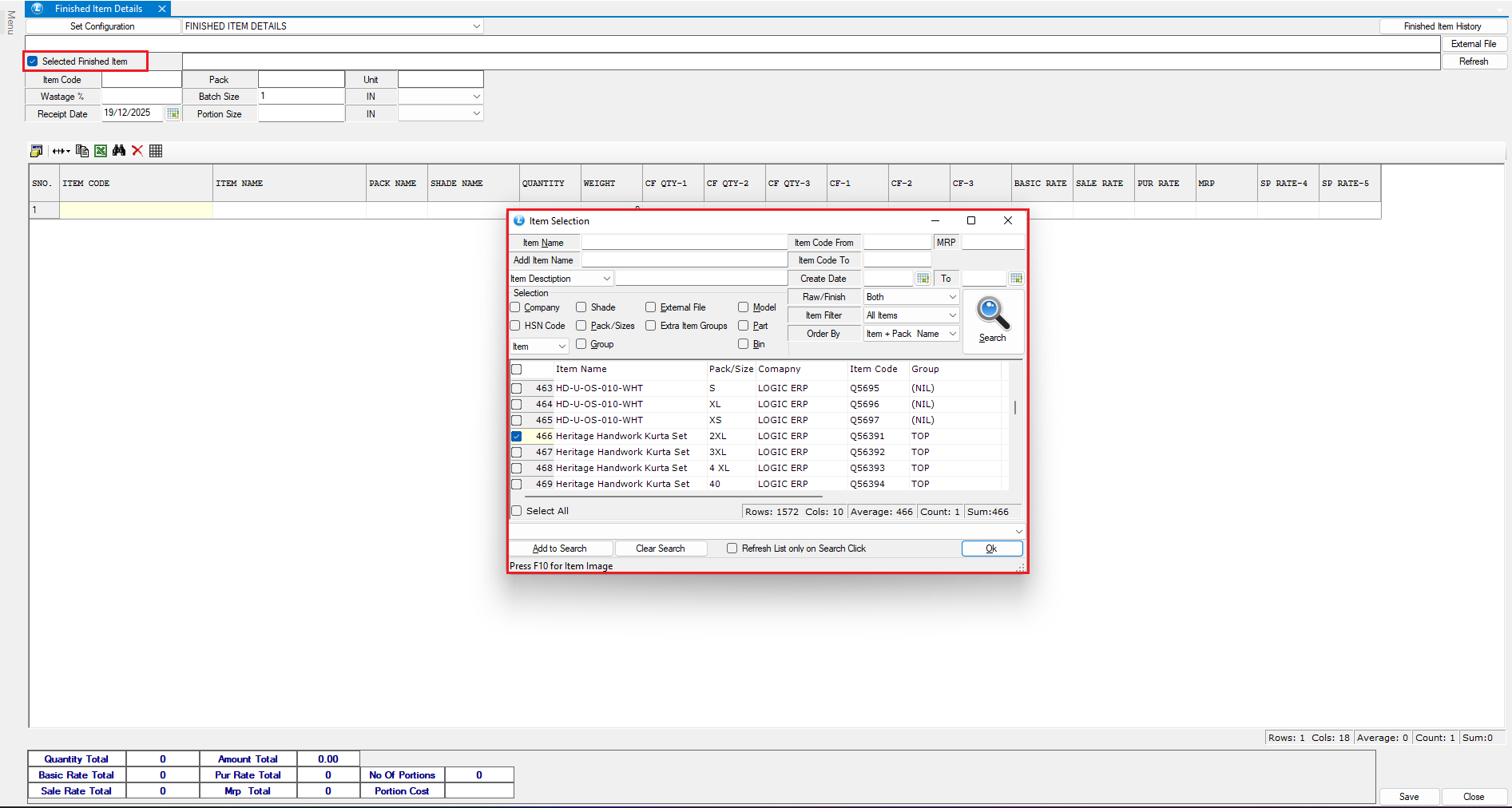
* Select the **Finished Item** from the search list.
* Enter the **Raw Material Items** that will be assembled to create the finished product
* Define the **required quantity** for each raw material
Once all raw material details are entered, click **Save** to store the configuration.
***
### **Review Finished Item History**
* Click on **Finished Item History**
* This option allows you to:
* View previously defined finished item details
* Verify historical configurations
***
### **Import Finished Item Details via Excel (Optional)**
Finished item details can also be defined using an **external Excel file**.
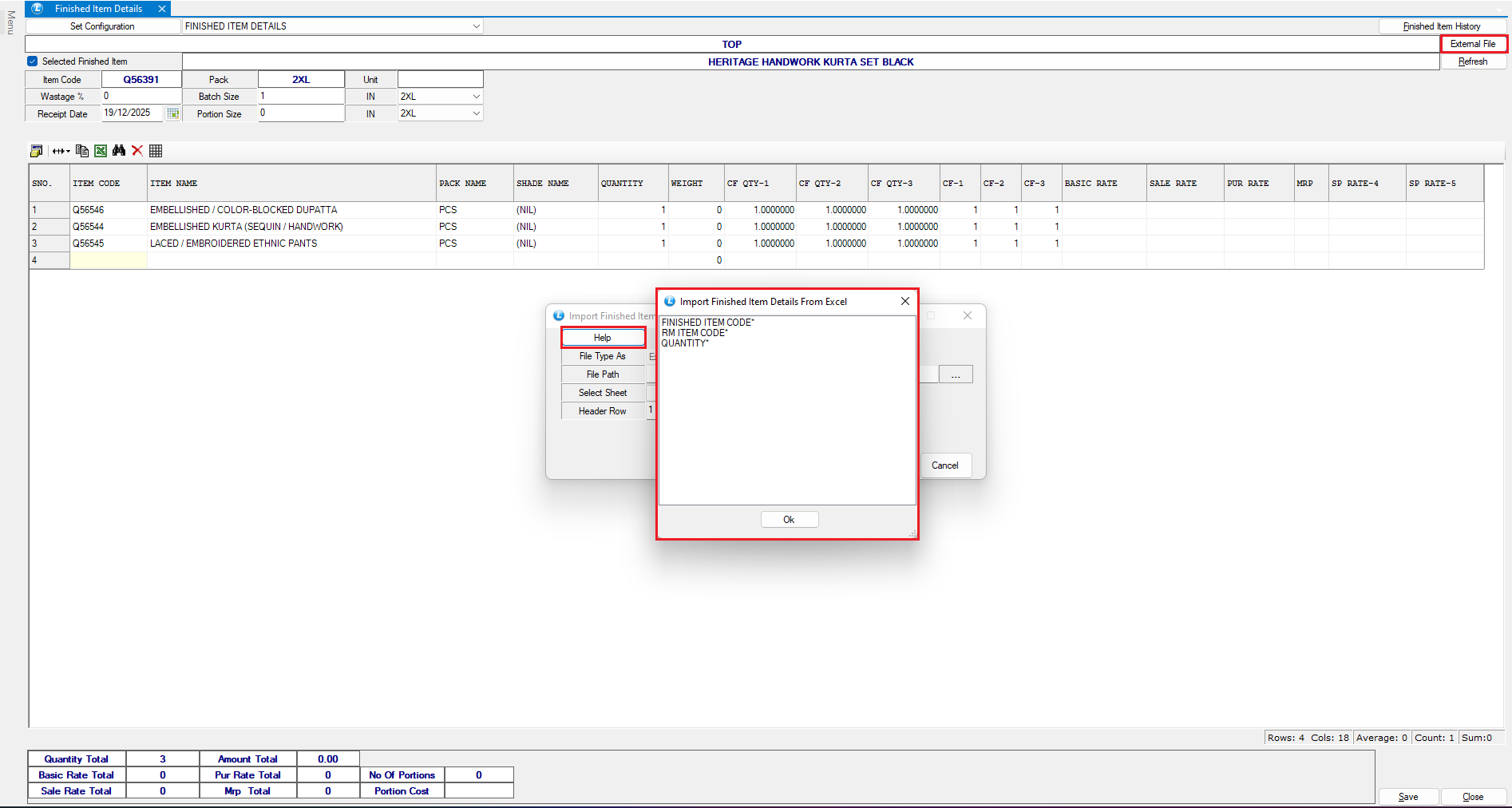
* Click on the **External File** option
* Use the **Help** button to understand:
* Mandatory columns
* Required data format
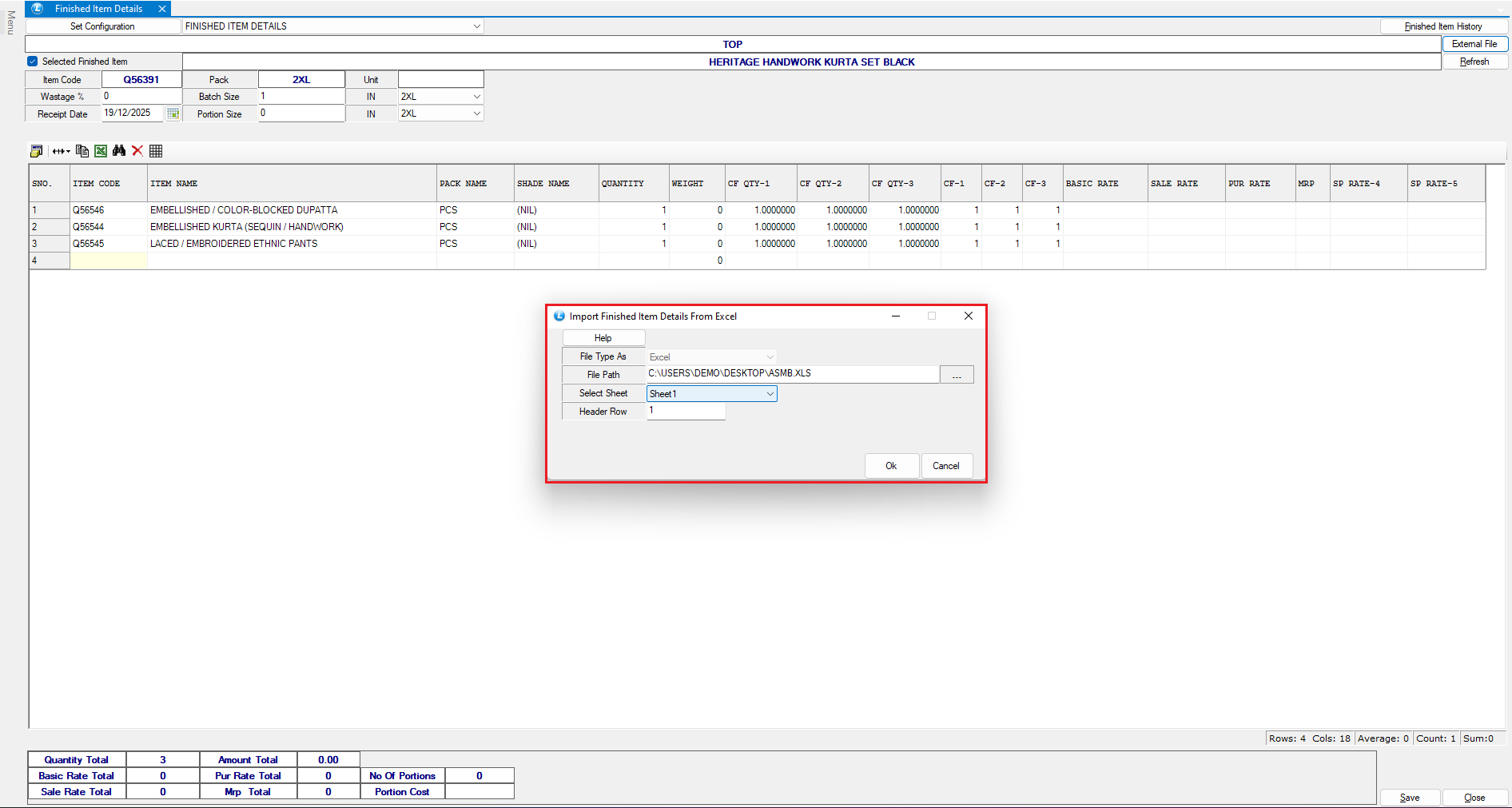
* Browse and select the Excel file
* Choose the appropriate **Sheet Number**
* Ensure the **Header Row** is set to **1**
* Click **OK**
The system will automatically import raw material details from the Excel sheet.\
Click **Save** to store the imported data.
You can verify the imported details by reselecting the finished item.
***
### **Perform Assembling**
* Open the **Assembling** window
* Select the **Finished Item**
* On the right-hand side, the system displays:
* All raw materials defined earlier
* Required quantities
> Assembling can be performed **only if sufficient raw material stock is available**.
* The default **production quantity** is set to **1**
* Select the **Issue To** name
* Click **Save** to complete the assembling process
***
### **Verify Stock Movement**
To review the impact on inventory:
* Open the **Stock Query Report**
* Select:
* All related **Raw Materials**
* The **Finished Item**
* Click **Create Report**
#### **Stock Impact Observed**
* Raw material stock is **reduced** as per defined quantities
* Finished item stock is **increased**
* Updated balances are visible in the **Closing Stock** column
***
### **Conclusion**
Setting up finished item details in Logic ERP ensures:
* Accurate raw material consumption during assembling
* Proper stock movement and inventory control
* Seamless integration between production and inventory
This process helps maintain **data accuracy, production discipline, and real-time stock visibility** across the system.
---
# Agent Instructions
This documentation is published with GitBook. GitBook is the documentation platform designed so that both humans and AI agents can read, navigate, and reason over technical content effectively. Learn more at gitbook.com.
## Querying This Documentation
If you need additional information that is not directly available in this page, you can query the documentation dynamically by asking a question.
Perform an HTTP GET request on the current page URL with the `ask` query parameter, and the optional `goal` query parameter:
```
GET https://kb.logicerp.com/logic-erp-learning-hub-tutorials-and-best-practices/setups/set-other-item-details/finished-item-details.md?ask=&goal=
```
`ask` is the immediate question: it should be specific, self-contained, and written in natural language.
`goal` is optional and describes the broader end goal you are ultimately trying to accomplish on behalf of the user. GitBook uses it to tailor the answer towards what is most useful for that goal.
The response will contain a direct answer to the question and relevant excerpts and sources from the documentation.
Use this mechanism when the answer is not explicitly present in the current page, you need clarification or additional context, or you want to retrieve related documentation sections.