> For the complete documentation index, see [llms.txt](https://kb.logicerp.com/llms.txt). Markdown versions of documentation pages are available by appending `.md` to page URLs; this page is available as [Markdown](https://kb.logicerp.com/logic-erp-learning-hub-tutorials-and-best-practices/setups/set-other-item-details/enter-item-other-details.md).
# Enter Item Other Details
**YouTube:** [How to Mark Items Requiring a Drug License or Food License for Sale?](https://youtu.be/fQm-VoyjXks)
## How to Mark Items Requiring a Drug License or Food License for Sale?
In this tutorial, we will learn how to **make Food License or Drug License mandatory for selected items during billing in Logic ERP**, and how the system enforces license validation at the time of transaction.
***
### Configuring Item-Level License Requirement
To begin, define the license requirement at the item level.
* Navigate to the **Setup Module** from the main menu
* Go to **Set Other Item Details**
* Open the **Enter Item Other Details** window
**Select Items**
* Choose the required **Item** from the search list
* Click **Refresh** to load item details
***
### Enabling Drug License Requirement
After refreshing the item details, you will see two important columns:
* **Food License Number**
* **Drug License Number**
**Make Drug License Mandatory**
* In the **DL Number Required** column, set the value to **Yes**
* To apply this setting to **all items at once**:
* Press **F2** on the column
* Set the value to **Yes**
* Click **Save** to apply the changes
***
### Verifying License-Marked Items
To check which items, require a drug license:
* Use the **Filter options** available at the top of the window
* Filter items where **Drug License Required = Yes**
* This helps in easy verification and review of all applicable items
***
### Effect During Sales Billing
Now, let’s see how this setting works during billing.
* Initiate a **New Sales Transaction**
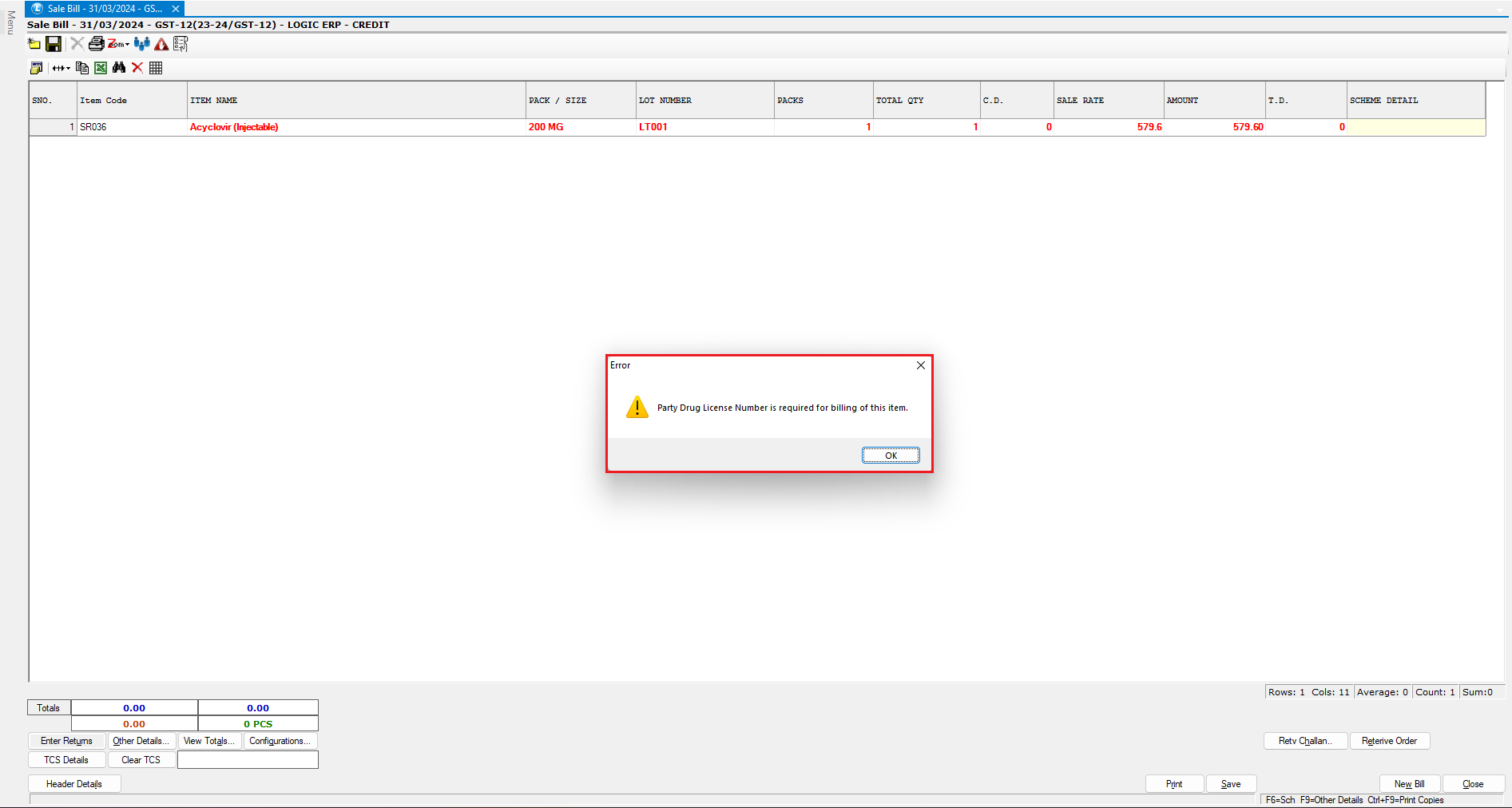
* Enter an item for which **Drug License is mandatory**
***System Behavior:***
* The system displays a prompt indicating that the **Party Drug License Number is required** to bill this item.
***
### Defining Party Drug License Number
To resolve the validation message:
* Go to the **Header Section** of the voucher
* Press **F6** to edit **Account Details**
* Enter the **Party Drug License Number**
* Save the account details
***
### Re-Initiating the Transaction
* Create a **New Transaction** for the same item
* This time, the system allows the billing process
The transaction proceeds successfully because the **Drug License Number is now defined in the party master**.
***
### Conclusion
This completes the setup for **making Food or Drug License mandatory for selected items in Logic ERP**, ensuring regulatory compliance and preventing unauthorized billing of restricted items.
---
# Agent Instructions
This documentation is published with GitBook. GitBook is the documentation platform designed so that both humans and AI agents can read, navigate, and reason over technical content effectively. Learn more at gitbook.com.
## Querying This Documentation
If you need additional information that is not directly available in this page, you can query the documentation dynamically by asking a question.
Perform an HTTP GET request on the current page URL with the `ask` query parameter, and the optional `goal` query parameter:
```
GET https://kb.logicerp.com/logic-erp-learning-hub-tutorials-and-best-practices/setups/set-other-item-details/enter-item-other-details.md?ask=&goal=
```
`ask` is the immediate question: it should be specific, self-contained, and written in natural language.
`goal` is optional and describes the broader end goal you are ultimately trying to accomplish on behalf of the user. GitBook uses it to tailor the answer towards what is most useful for that goal.
The response will contain a direct answer to the question and relevant excerpts and sources from the documentation.
Use this mechanism when the answer is not explicitly present in the current page, you need clarification or additional context, or you want to retrieve related documentation sections.