> For the complete documentation index, see [llms.txt](https://kb.logicerp.com/llms.txt). Markdown versions of documentation pages are available by appending `.md` to page URLs; this page is available as [Markdown](https://kb.logicerp.com/logic-erp-version-release-notes/january-2026/reports/discount-coupon-group-and-prefix-columns-added-to-sales-register-cross-tab.md).
# Discount Coupon Group & Prefix Columns Added to Sales Register - Cross Tab
**YouTube:** [Jan 2026 Release Notes: Discount Coupon Group & Prefix Columns Added to Sales Register - Cross Tab](https://www.youtube.com/watch?v=5D5glRglPbE)
## Jan 2026 Release Notes: Discount Coupon Group & Prefix Columns Added to Sales Register - Cross Tab
In this tutorial, we will introduce the **newly added Discount Coupon–related columns** in the **Sales Register Cross Tab Report** in Logic ERP. Let’s get started.
***
### Open the Sales Register Cross Tab Report
* Go to the **Reports & Queries** section.
* Select **Sales Registers**.
* Open the **Sales Register - Cross Tab Report**.
* From the available configurations, select **Retail Customer-Wise Sales Report**.
* Click on **Create Report**.
***
### Enable Discount Coupon Columns
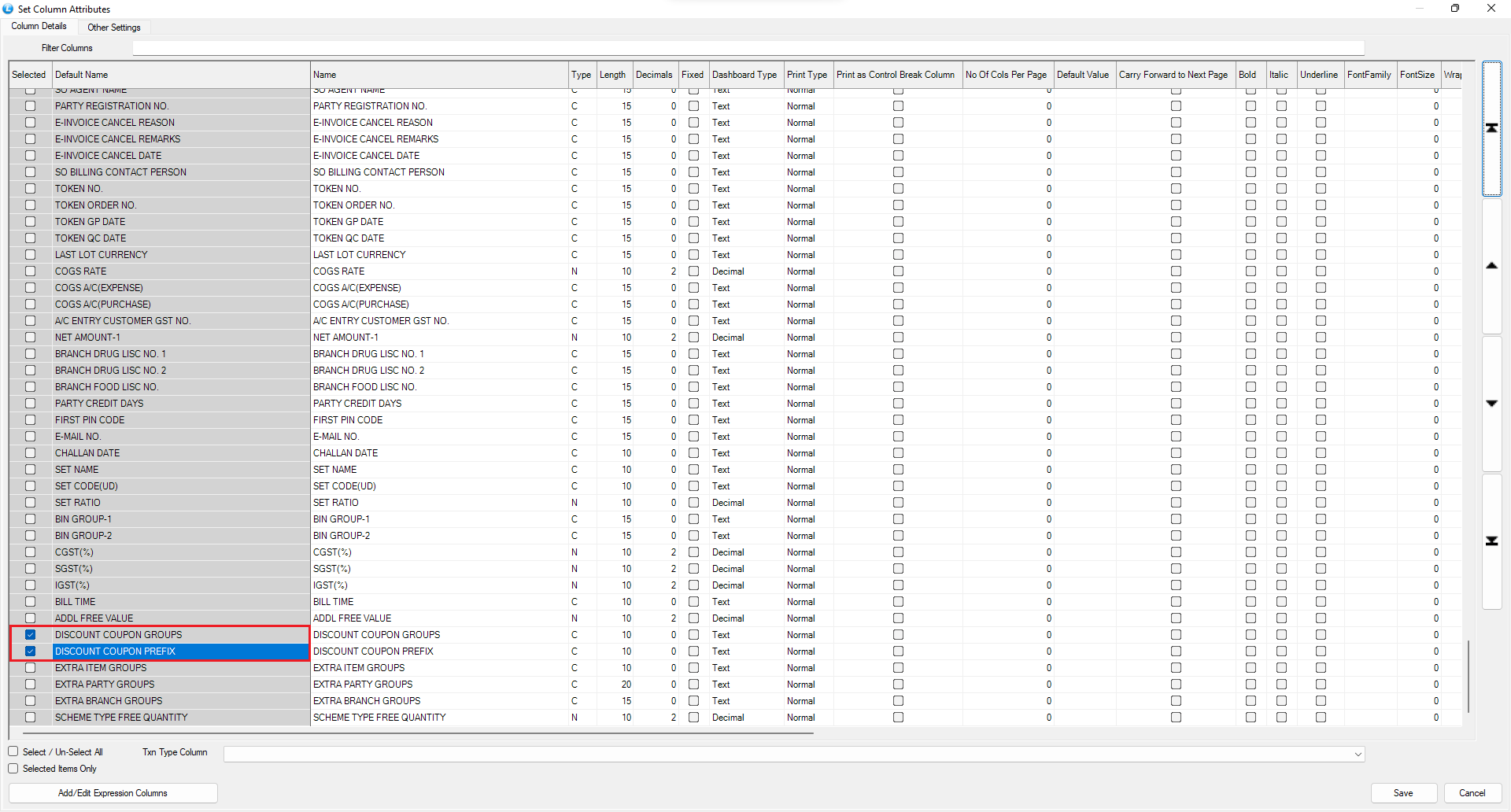
* In the generated report, open **Set Column Attributes**.
* Locate the newly introduced columns:
* **Discount Coupon Group**
* **Discount Coupon Prefix**
* Enable these columns by ticking the checkboxes.
* Rearrange the columns if required.
***
### Refresh and View the Report
* Save the column settings.
* Press **F2** to refresh the report.
As observed, the **Discount Coupon Group** and **Discount Coupon Prefix** columns are now successfully added and correctly displaying their respective values in the report.
***
### Conclusion
This update allows you to:
* Track **coupon usage** more effectively
* Analyze sales based on **coupon groups and prefixes**
* Gain better visibility into **discount-driven sales performance**
With this enhancement, the Sales Register Cross Tab Report in Logic ERP becomes more insightful and analytics friendly.
---
# Agent Instructions
This documentation is published with GitBook. GitBook is the documentation platform designed so that both humans and AI agents can read, navigate, and reason over technical content effectively. Learn more at gitbook.com.
## Querying This Documentation
If you need additional information that is not directly available in this page, you can query the documentation dynamically by asking a question.
Perform an HTTP GET request on the current page URL with the `ask` query parameter, and the optional `goal` query parameter:
```
GET https://kb.logicerp.com/logic-erp-version-release-notes/january-2026/reports/discount-coupon-group-and-prefix-columns-added-to-sales-register-cross-tab.md?ask=&goal=
```
`ask` is the immediate question: it should be specific, self-contained, and written in natural language.
`goal` is optional and describes the broader end goal you are ultimately trying to accomplish on behalf of the user. GitBook uses it to tailor the answer towards what is most useful for that goal.
The response will contain a direct answer to the question and relevant excerpts and sources from the documentation.
Use this mechanism when the answer is not explicitly present in the current page, you need clarification or additional context, or you want to retrieve related documentation sections.