> For the complete documentation index, see [llms.txt](https://kb.logicerp.com/llms.txt). Markdown versions of documentation pages are available by appending `.md` to page URLs; this page is available as [Markdown](https://kb.logicerp.com/logic-erp-learning-hub-tutorials-and-best-practices/order-processing/purchase-order/po-configuration/do-not-allow-duplicate-order-no.-for-same-supplier.md).
# Do not allow duplicate Order No. for Same Supplier
**YouTube:** [How to Restrict Duplicate Supplier Order Numbers in Purchase Orders?](https://youtu.be/ZbzREFv1w0o)
## How to Restrict Duplicate Supplier Order Numbers in Purchase Orders?
This tutorial explains how to prevent entering **duplicate Supplier Order Numbers** for the same supplier in Purchase Orders in Logic ERP. This validation ensures every supplier order reference remains unique, improving accuracy and tracking.
***
### **Objective of This Feature**
* Prevent duplicate **Supplier Order Numbers**
* Maintain unique supplier references
* Avoid confusion in order tracking
* Improve data accuracy and control
***
### **Create Initial Purchase Order (Default Behavior)**
**Process**
* Open **Purchase Order Module**
* Select **Supplier**
* Go to **Other Details**
* Enter **Supplier Order Number**
**Next Steps**
* Proceed to **Item Details Section**
* Enter items and **Save** the Purchase Order
> **Note:** The system currently allows duplicate Supplier Order Numbers. To restrict this, follow the steps below.
***
#### **Enable Duplicate Restriction**
* Open **Configuration Window**
* Go to **Other Settings**
* Locate and enable the option labeled as:
> **“Do not allow duplicate Supp. Order No. for Same Supplier”**
* Click **OK** to apply changes.
***
### **Implement in New Purchase Order**
**Transaction Process**
* Start a **New Purchase Order Entry**
* Select the **Same Supplier**
**Enter Duplicate Supplier Order Number**
* Go to **Other Details**
* Enter the **same Supplier Order Number** used earlier
**Next**
* Proceed to **Item Details Section**
* Enter item details
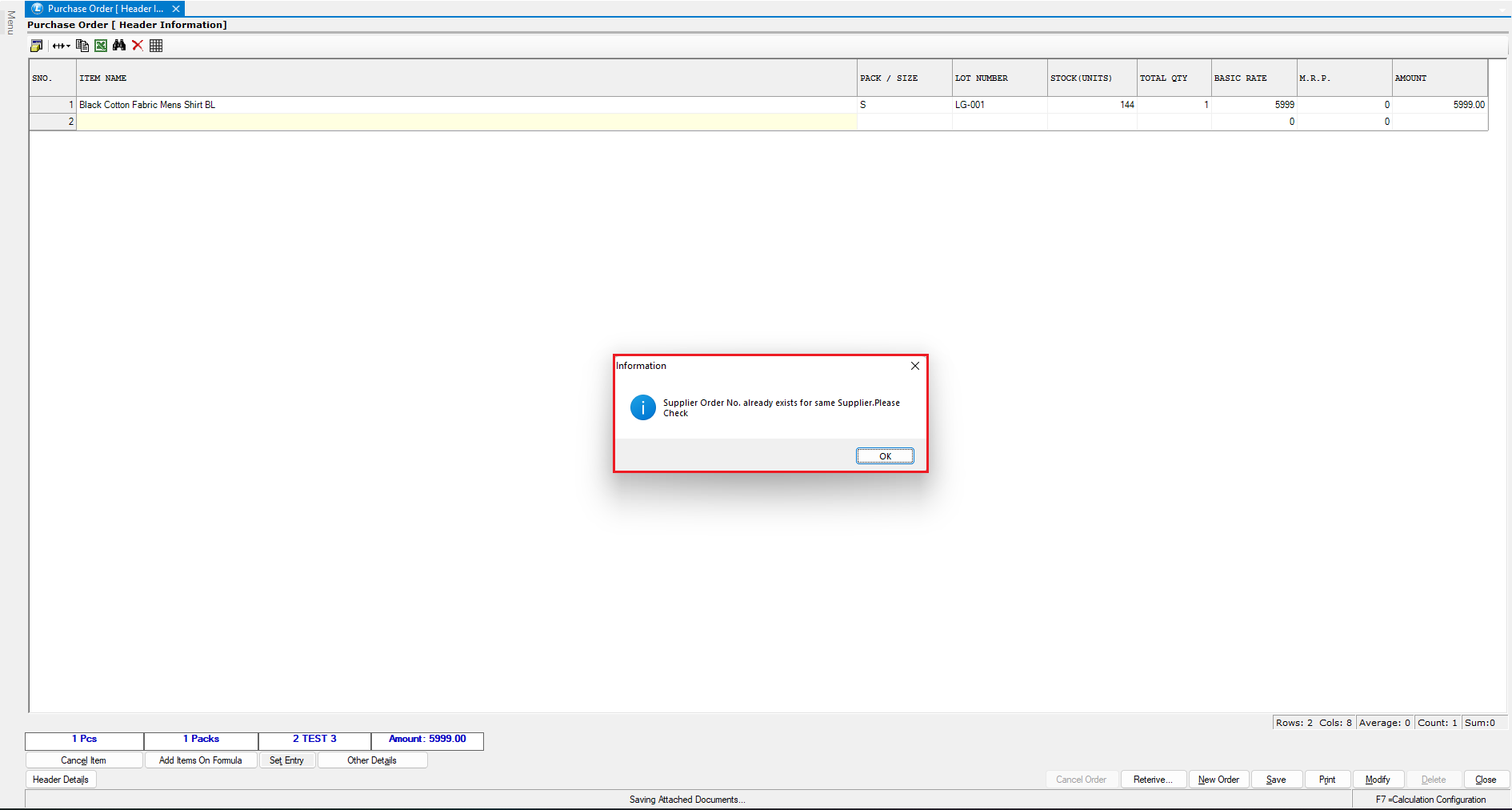
**System Validation**
* While saving, system **restricts the entry**
* Displays alert message:
* *Supplier Order Number already exists for the same supplier*
**Correct Action**
* Modify the **Supplier Order Number**
* Enter a **unique value**
**Result**
* Purchase Order is successfully saved
***
### **Key Benefits**
* Ensures unique supplier order tracking
* Prevents duplicate entries
* Improves record accuracy
* Enhances audit and reporting clarity
***
### **Best Practice Tips**
* Always follow a structured numbering system
* Avoid reusing supplier order references
* Train users to verify before entry
***
### **Final Outcome**
* Duplicate Supplier Order Numbers are restricted
* Each supplier order remains unique
* Better control and accuracy in Purchase Orders
* Improved efficiency and data reliability
---
# Agent Instructions
This documentation is published with GitBook. GitBook is the documentation platform designed so that both humans and AI agents can read, navigate, and reason over technical content effectively. Learn more at gitbook.com.
## Querying This Documentation
If you need additional information that is not directly available in this page, you can query the documentation dynamically by asking a question.
Perform an HTTP GET request on the current page URL with the `ask` query parameter, and the optional `goal` query parameter:
```
GET https://kb.logicerp.com/logic-erp-learning-hub-tutorials-and-best-practices/order-processing/purchase-order/po-configuration/do-not-allow-duplicate-order-no.-for-same-supplier.md?ask=&goal=
```
`ask` is the immediate question: it should be specific, self-contained, and written in natural language.
`goal` is optional and describes the broader end goal you are ultimately trying to accomplish on behalf of the user. GitBook uses it to tailor the answer towards what is most useful for that goal.
The response will contain a direct answer to the question and relevant excerpts and sources from the documentation.
Use this mechanism when the answer is not explicitly present in the current page, you need clarification or additional context, or you want to retrieve related documentation sections.