> For the complete documentation index, see [llms.txt](https://kb.logicerp.com/llms.txt). Markdown versions of documentation pages are available by appending `.md` to page URLs; this page is available as [Markdown](https://kb.logicerp.com/logic-erp-learning-hub-tutorials-and-best-practices/inventory/stock-transfer-godown-wise/stock-transfer-godown-wise-configuration/lot-selection.md).
# Lot Selection
**YouTube:** [How to Configure Lot Selection in Godown Wise - Stock Transfers?](https://www.youtube.com/watch?v=ytLFvB5J4XY)
## How to Configure Lot Selection in Godown Wise - Stock Transfers?
In this tutorial, we will understand **how lot selection works while making godown-wise stock transfer entries in Logic ERP**.
***
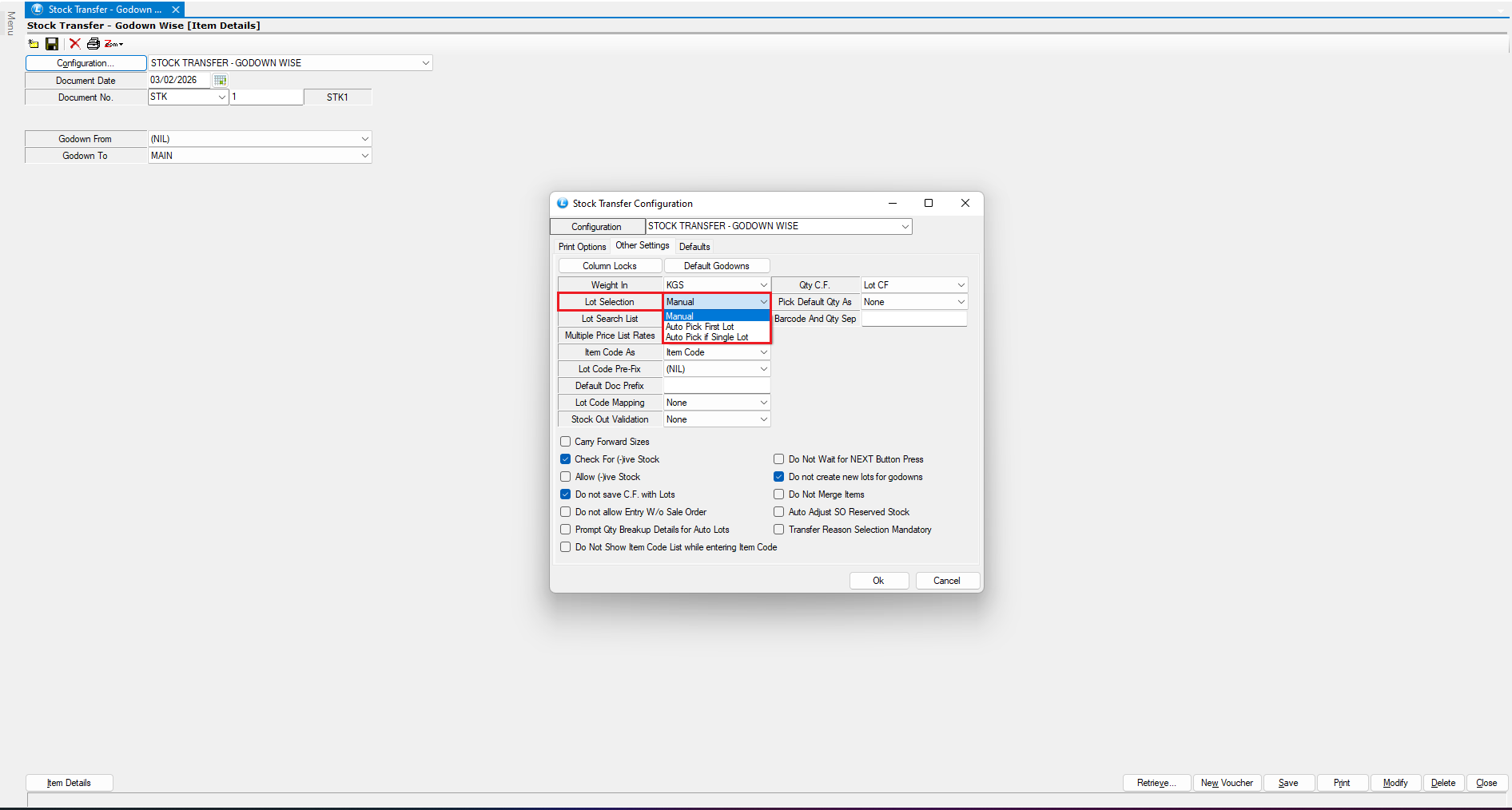
### Access Lot Selection Configuration
* Open the **Configuration** window.
* Navigate to **Other Settings**.
* Locate the **Lot Selection** option.
* This setting controls how the system selects stock lots during a godown-wise stock transfer.
* By default, **Lot Selection** is set to **Manual**.
***
### Lot Selection Mode: Manual (Default)
* Select the **Godown From** and **Godown To**.
* Initiate a **new stock transfer transaction**.
* Enter the item details.
**Result:**
* The **Lot Selection window appears**.
* The system prompts the user to **manually choose the lot** to be transferred.
**Use Case:**
* Suitable when users need **full control** over which lot is selected.
***
### Lot Selection Mode: Auto Pick First Lot (FIFO)
* Open **Configuration → Other Settings**.
* Set **Lot Selection** to **Auto Pick First Lot**.
* Save the configuration.
* Now, create a **new stock transfer voucher** and select the godowns.
* As soon as you select the item, you will see that the lot has been picked on a FIFO basis.
**Result:**
* The system **automatically selects the first-created lot**.
* This follows the **FIFO (First In, First Out)** principle.
**Benefit:**
* Ensures **older stock is transferred first**
* Helps maintain proper stock rotation
***
### Lot Selection Mode: Auto Pick Single Lot
* Go back to **Configuration → Other Settings**.
* Select **Auto Pick Single Lot**.
* Save the configuration.
* Initiate a **new stock transfer entry**.
**Result:**
* If **only one lot** is available for an item:
* The system **automatically picks the lot**.
* If **multiple lots** are available:
* The **lot selection window appears**, requiring **manual selection**.
**Benefit:**
* Saves time when only one lot exists
* Maintains control when multiple lots are available
***
### Conclusion
Logic ERP provides **three flexible lot selection methods** for godown-wise stock transfers:
* **Manual** – User selects the lot every time
* **Auto Pick First Lot** – Automatically follows FIFO
* **Auto Pick Single Lot** – Auto-picks only when one lot is available
By choosing the appropriate option, you can balance **automation, accuracy, and control** in your stock transfer process.
---
# Agent Instructions
This documentation is published with GitBook. GitBook is the documentation platform designed so that both humans and AI agents can read, navigate, and reason over technical content effectively. Learn more at gitbook.com.
## Querying This Documentation
If you need additional information that is not directly available in this page, you can query the documentation dynamically by asking a question.
Perform an HTTP GET request on the current page URL with the `ask` query parameter, and the optional `goal` query parameter:
```
GET https://kb.logicerp.com/logic-erp-learning-hub-tutorials-and-best-practices/inventory/stock-transfer-godown-wise/stock-transfer-godown-wise-configuration/lot-selection.md?ask=&goal=
```
`ask` is the immediate question: it should be specific, self-contained, and written in natural language.
`goal` is optional and describes the broader end goal you are ultimately trying to accomplish on behalf of the user. GitBook uses it to tailor the answer towards what is most useful for that goal.
The response will contain a direct answer to the question and relevant excerpts and sources from the documentation.
Use this mechanism when the answer is not explicitly present in the current page, you need clarification or additional context, or you want to retrieve related documentation sections.