> For the complete documentation index, see [llms.txt](https://kb.logicerp.com/llms.txt). Markdown versions of documentation pages are available by appending `.md` to page URLs; this page is available as [Markdown](https://kb.logicerp.com/logic-erp-learning-hub-tutorials-and-best-practices/billing/packing-slip/packing-slip-configuration/filter-sales-orders-created-from-branch-wise-so-allocation.md).
# Filter Sales Orders Created from Branch Wise SO Allocation
**YouTube:** [How to Filter Sales Orders Created by Branch-Wise SO Allocation in Packing Slips?](https://youtu.be/BUybxCIwnhE)
## How to Filter Sales Orders Created by Branch - Wise SO Allocation in Packing Slips?
In this tutorial, we will learn how to configure Logic ERP to display only those **Sales Orders created through Branch-Wise Sales Order Allocation** while creating a Packing Slip.
***
### Objective of This Feature
* Filter Sales Orders created through branch-wise allocation
* Display only relevant Sales Orders
* Simplify Sales Order selection
* Reduce unnecessary entries in the search list
* Improve Packing Slip entry efficiency
***
### Observe the Default Behavior
* Initiate a new **Packing Slip** entry.
* Select the required **Customer**.
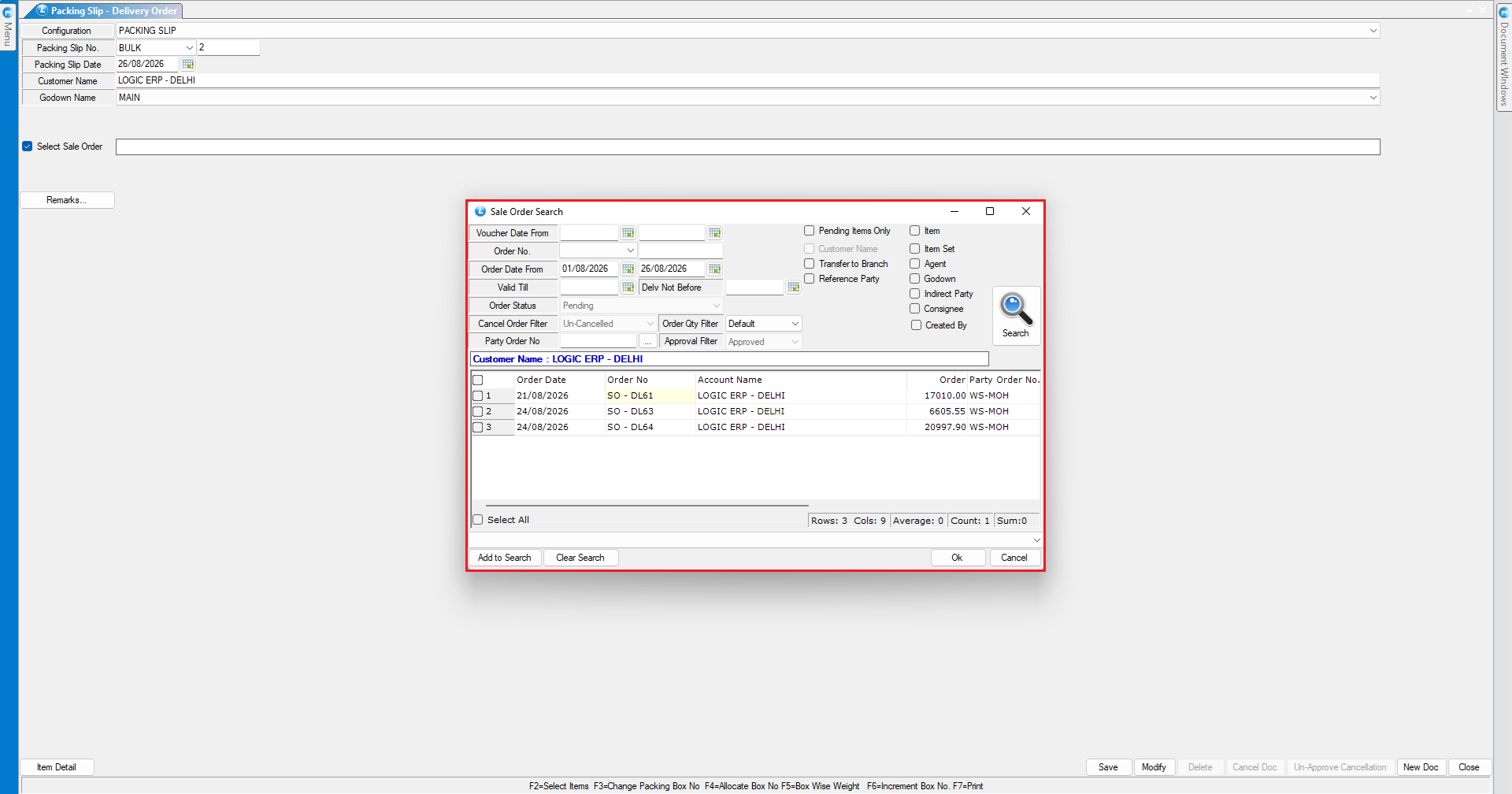
* Open the **Sales Order Selection** window.
**Result:**
The search list displays **all available Sales Orders** associated with the selected customer, regardless of how they were created.
***
### Enable Branch-Wise SO Allocation Filter
* Open the **Packing Slip Configuration** window.
* Navigate to the **Other Options Four** section.
* Locate and enable the option labeled as:
> **"Filter Sales Orders Created from Branch Wise SO Allocation"**
* Save the configuration changes.
***
### Verify the Configuration
* Initiate a new **Packing Slip** entry.
* Select the required **Customer**.
* Open the **Sales Order Selection** window.
**Result**
The search list now displays **only those Sales Orders that were created from Branch-Wise Sales Order Allocation**.
***
### Key Benefits
* **Focused Search:** Displays only relevant Sales Orders.
* **Faster Selection:** Makes Sales Order retrieval easier.
* **Reduced Clutter:** Removes unrelated Sales Orders from the list.
* **Improved Accuracy:** Helps users select the appropriate allocated Sales Order.
* **Efficient Workflow:** Streamlines Packing Slip creation.
***
### Final Outcome
After enabling **"Filter Sales Orders Created from Branch Wise SO Allocation"**, Logic ERP filters the Sales Order selection list and displays only the Sales Orders **created through Branch-Wise Sales Order Allocation**, making the Packing Slip entry process faster and more efficient.
---
# Agent Instructions
This documentation is published with GitBook. GitBook is the documentation platform designed so that both humans and AI agents can read, navigate, and reason over technical content effectively. Learn more at gitbook.com.
## Querying This Documentation
If you need additional information that is not directly available in this page, you can query the documentation dynamically by asking a question.
Perform an HTTP GET request on the current page URL with the `ask` query parameter, and the optional `goal` query parameter:
```
GET https://kb.logicerp.com/logic-erp-learning-hub-tutorials-and-best-practices/billing/packing-slip/packing-slip-configuration/filter-sales-orders-created-from-branch-wise-so-allocation.md?ask=&goal=
```
`ask` is the immediate question: it should be specific, self-contained, and written in natural language.
`goal` is optional and describes the broader end goal you are ultimately trying to accomplish on behalf of the user. GitBook uses it to tailor the answer towards what is most useful for that goal.
The response will contain a direct answer to the question and relevant excerpts and sources from the documentation.
Use this mechanism when the answer is not explicitly present in the current page, you need clarification or additional context, or you want to retrieve related documentation sections.