> For the complete documentation index, see [llms.txt](https://kb.logicerp.com/llms.txt). Markdown versions of documentation pages are available by appending `.md` to page URLs; this page is available as [Markdown](https://kb.logicerp.com/logic-erp-learning-hub-tutorials-and-best-practices/accounts/a-c-voucher/cash-bank-payments-requisition-and-vouchers.md).
# Cash/Bank Payments - Requisition and Vouchers
**YouTube:** [CASH/BANK PAYMENT REQUISITION VOUCHER](https://www.youtube.com/watch?v=wOkavrDPsNI)
## CASH/BANK PAYMENT REQUISITION VOUCHER
In this tutorial, we will learn how to use the **Cash/Bank Payment Requisition** feature in Logic ERP.
This feature allows users to **request approval before creating actual cash or bank payment entries**, ensuring better control and accurate cash flow management.
***
### **Setup Approval System**
* Go to the **User Access Module**
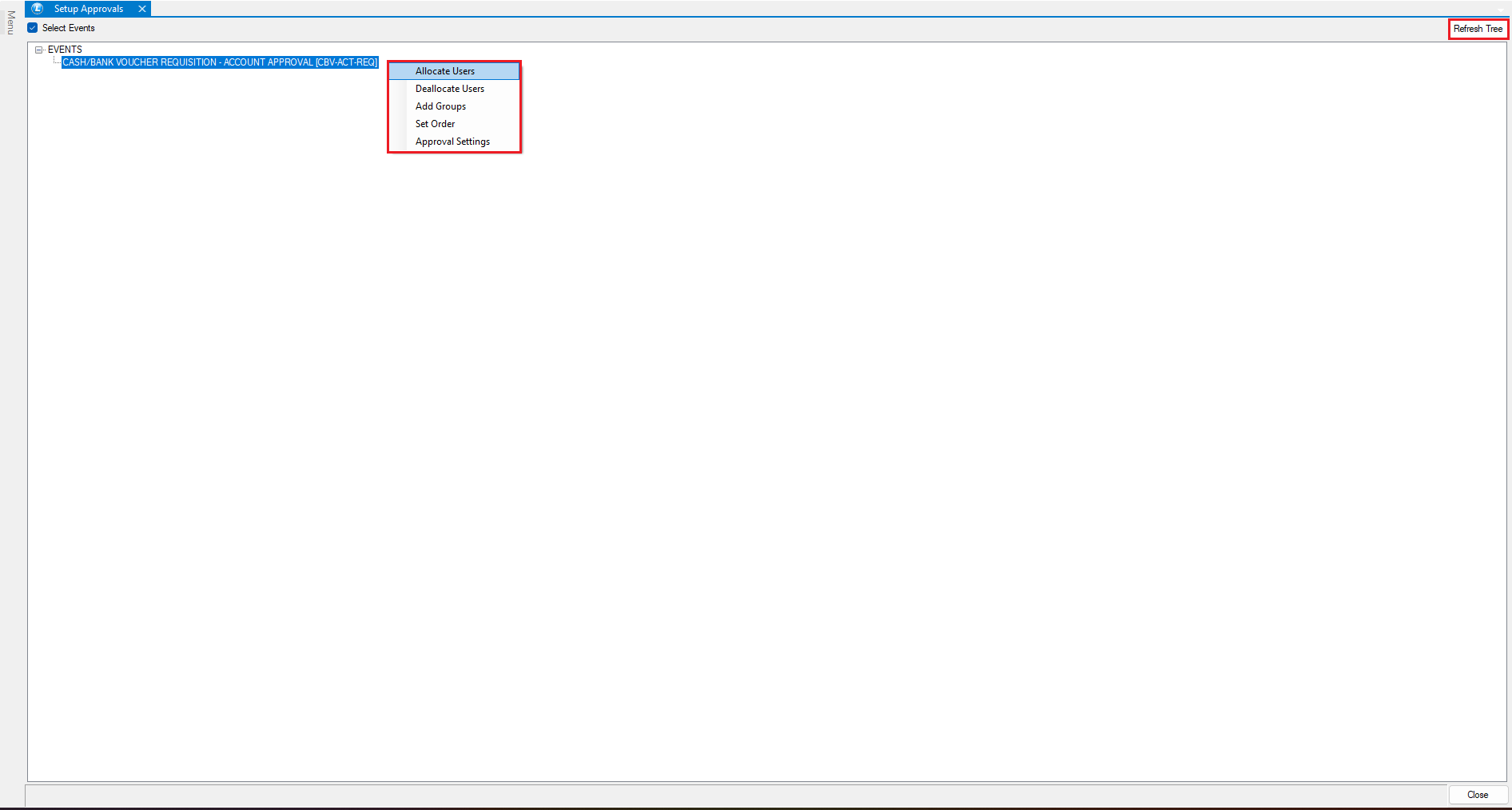
* Open **“Setup Approval”**
* Tick the **Select Event** checkbox
* From the event list, select:
> *Cash/Bank Voucher Requisition Account Approval*
* Click on **Refresh Tree** and **Right-Click** on the event
* Assign the **user(s)** for approval
* Save the settings
***
### **User Creates Requisition Entry**
* Login with the **User ID**
* Go to **Accounts Vouchers**
* Open **Cash/Bank Payments - Requisition**
* Enter the following details:
* Account Name
* Amount
* Narration
* Save the requisition entry
The entry will now **wait for admin approval**
***
### **Admin Approves or Rejects Entries**
* Login with **Administrator ID**
* Open **My Messages Module**
Here, all pending requisition entries will be displayed
* To **Approve**:
* Right-click on the entry
* Click **Approve Event**
* Double-click or press **F2**
* Yellow flag indicates approval
* Save
* To **Reject**:
* Right-click on the entry
* Move it to **Rejected Items**
***
### **Additional Options**
* **Cancel Entry**:
* Press **F3**
* A **Red Flag** will appear
* Add remarks/reason for cancellation
* **Hold Entry**:
* Simply close without action
* Can be reviewed later
***
### **Create Payment Voucher from Approved Requisitions**
* Go to **Accounts Vouchers**
* Open **“Create Cash/Bank Payment Vouchers from Requisitions”**
* Select the requisition document
* Click **Refresh**
* **Enter:**
* Receipt Number
* Receipt Date
* Press **Spacebar / Double-click** to select entries
* Green flag indicates selection
* Click **Save**
***
### **Verify Entries**
* Navigate to **Cash/Bank Payment Window**
* Search and open the voucher
You will see:
* All details are **automatically carried forward**
* Entries match the approved requisitions
***
### **Conclusion**
The Cash/Bank Payment Requisition system helps you:
* Maintain strict **approval control**
* Improve **cash flow accuracy**
* Reduce unauthorized transactions
* Ensure **audit-ready financial processes**
---
# Agent Instructions
This documentation is published with GitBook. GitBook is the documentation platform designed so that both humans and AI agents can read, navigate, and reason over technical content effectively. Learn more at gitbook.com.
## Querying This Documentation
If you need additional information that is not directly available in this page, you can query the documentation dynamically by asking a question.
Perform an HTTP GET request on the current page URL with the `ask` query parameter, and the optional `goal` query parameter:
```
GET https://kb.logicerp.com/logic-erp-learning-hub-tutorials-and-best-practices/accounts/a-c-voucher/cash-bank-payments-requisition-and-vouchers.md?ask=&goal=
```
`ask` is the immediate question: it should be specific, self-contained, and written in natural language.
`goal` is optional and describes the broader end goal you are ultimately trying to accomplish on behalf of the user. GitBook uses it to tailor the answer towards what is most useful for that goal.
The response will contain a direct answer to the question and relevant excerpts and sources from the documentation.
Use this mechanism when the answer is not explicitly present in the current page, you need clarification or additional context, or you want to retrieve related documentation sections.